
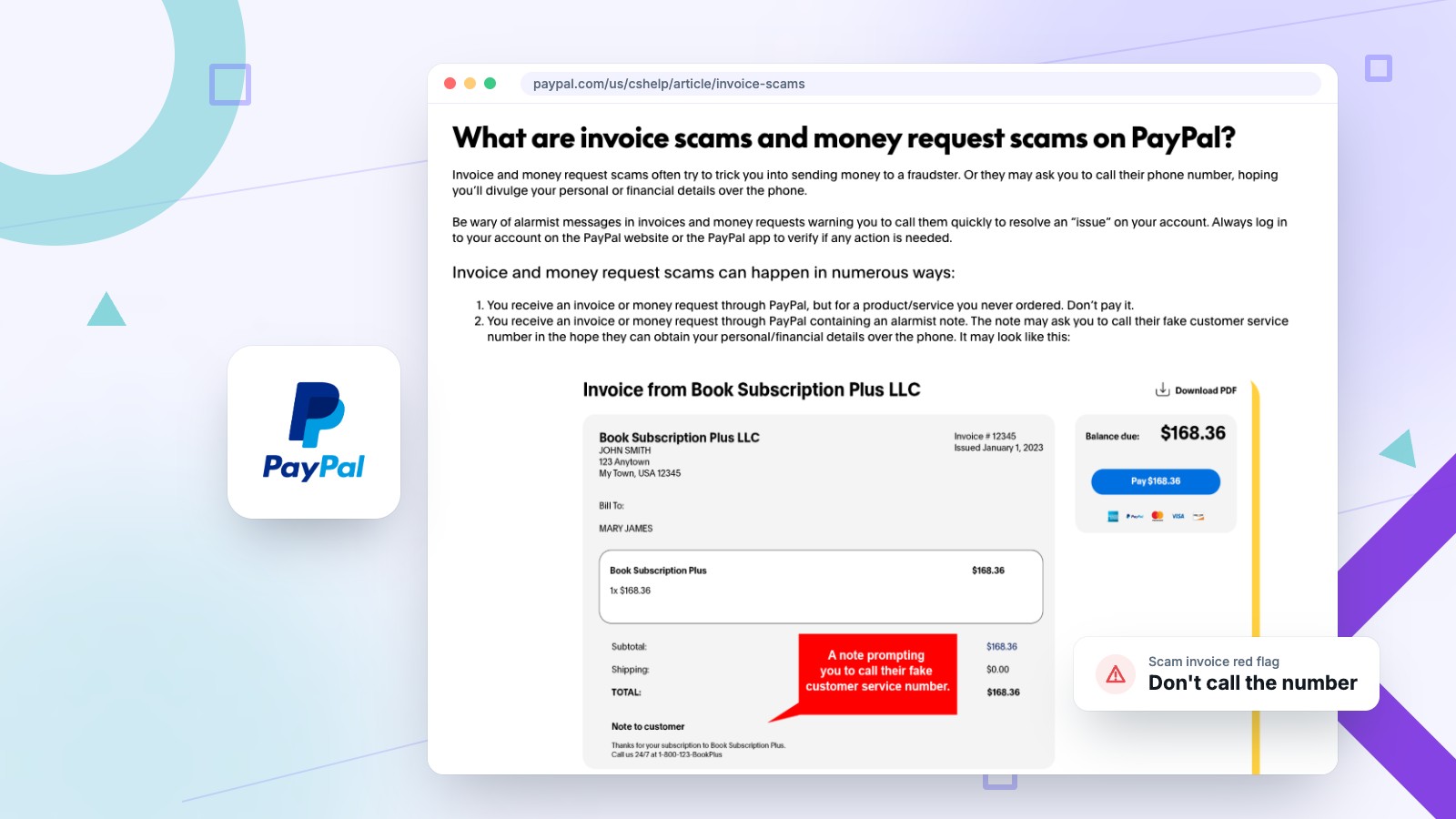

The PayPal invoice scam usually looks like this: an invoice or “receipt” for a few hundred dollars you never spent, often for Norton, McAfee, Geek Squad or a new laptop, with a note telling you to call a support number right away if you want to cancel. Do not call it and do not pay it. The invoice is the bait, and the phone call is the actual scam. Below is how it works, why the email can come from PayPal’s real address, and exactly what to do, including what to do if you already called.
Small businesses are a favorite target, because addresses like info@ and billing@ are public and invoices are part of a normal day. Everything below links to PayPal’s own guidance, the FTC or the security researchers who documented each version of the scam.
What is the PayPal invoice scam?
It is a fake invoice or payment request for something you never bought, with an urgent note telling you to call a “support” number. The number goes straight to the scammers.
PayPal describes two versions on its invoice scam help page. In the first, you receive an invoice or money request through PayPal for a product or service you never ordered, sometimes with an alarmist note asking you to call a fake customer service number. In the second, fraudsters send a fake invoice by email that is designed to look like a real PayPal message.
The amounts are picked to cause panic without seeming absurd. One example documented by Malwarebytes in October 2025 claimed “Your account has been billed $823.00” for Geek Squad. The goal is to get you on the phone before you stop and check your account.
Why does a scam invoice come from PayPal’s real email address?
Scammers use PayPal’s own invoicing and notification tools, so PayPal itself sends the message. A real service@paypal.com sender does not prove the invoice is legitimate.
That is how careful people get caught. Anyone can open a PayPal account and send an invoice to any email address, and the note on that invoice can say whatever the scammer wants, including a fake phone number. PayPal then delivers it like any other invoice.
Scammers have also found ways to sneak their text into PayPal’s automatic emails. In February 2025, BleepingComputer reported that scammers were putting fake purchase notices into PayPal’s “new address” confirmation emails, which came from service@paypal.com and claimed a $1,098.95 MacBook order along with a fake support number. In December 2025, Malwarebytes reported that PayPal closed a similar loophole involving paused subscriptions. Loopholes get closed and new ones turn up, so judge a message by what it asks you to do. The sender address tells you very little.
How can you tell if a PayPal invoice is fake?
A fake invoice is for something you never bought, pushes you to call a phone number, and creates urgency. The only reliable check is logging in to PayPal yourself.
- You don’t recognize the purchase. Antivirus renewals, crypto purchases, Geek Squad plans and expensive electronics are the most common cover stories.
- There is a phone number in the note. PayPal’s advice is plain: don’t call any phone numbers in the invoice note and don’t open suspicious links. A real merchant invoice does not need you to phone anyone to “cancel.”
- It is urgent. “Call within 24 hours or the charge will be processed” is a pressure tactic. PayPal lists urgency as a sign of a fake message.
- It uses a generic greeting. PayPal says its messages always use the full name on your account. “Dear user” or “Hello, PayPal member” is a red flag.
- It has an attachment or comes from a free email address. The Geek Squad version Malwarebytes documented came from a Gmail address with an attached “invoice.” Don’t open attachments you weren’t expecting.
- It mentions crypto. PayPal warns never to send money to a cryptocurrency wallet mentioned in an invoice or money request.
Whatever the email looks like, check it the same way: open a new browser tab, type paypal.com yourself (or open the PayPal app) and look at your activity. PayPal’s own guidance is to always log in to your account directly to see whether any action is needed. If there is no charge in your real account, there is no charge.
What happens if you call the number on a fake PayPal invoice?
A fake “support agent” talks you into installing remote access software, then uses it to get into your bank account or sell you fake protection. This is where people lose money.
In the version BleepingComputer documented, callers were talked into downloading ConnectWise ScreenConnect, a legitimate remote support tool, which let the scammers steal banking credentials, install malware or take data. In the Geek Squad version, the “tech” asked for remote access to the victim’s computer and pushed them to install more tools.
A common twist is the fake refund. The scammer offers to “refund” the charge, claims they sent too much by mistake, and asks you to send the difference back. The FTC’s advice on these refund calls is simple: if anyone wants to connect to your computer, hang up and report it.
Can you just ignore a fake PayPal invoice?
Yes. An invoice is only a request for payment, so no money moves unless you pay it. Report it first so PayPal can shut down the sender’s account.
Receiving a scam invoice does not mean your PayPal account was hacked. The scammer only needed your email address, which is often public on your website or easy to guess for a business. Ignoring it is safe. Reporting it is better, because it helps get the account that sent it closed before it reaches someone else.
What should you do if you get a PayPal scam invoice?
Don’t pay, call or click. Log in to PayPal directly, report the invoice from your account, forward the email to phishing@paypal.com, then delete it.
- Don’t pay, don’t call, don’t click. Leave the links, buttons, attachments and phone number alone.
- Check your real account. Type paypal.com into a new tab or open the PayPal app and look at your recent activity.
- Report the invoice in PayPal. PayPal asks you to report unwarranted invoices and money requests by logging in to your account on the website or app, per its invoice scam page.
- Forward suspicious emails to phishing@paypal.com. That is the address PayPal gives for reporting fake PayPal emails.
- Report it to the FTC. File it at ReportFraud.ftc.gov, especially if you lost money. Then delete the email.
What if you already called, paid or gave them access?
End the call and disconnect the computer, call your bank, change your passwords from a different device, remove any remote access software and dispute any payments.
- Cut the connection. Hang up, and if they were on your computer, disconnect it from the internet so the remote session ends.
- Call your bank and card issuer. Use the number on the back of your card, not one from the email. Tell them what happened so they can watch for or block transfers.
- Change your passwords from another device. Start with email, banking and PayPal, and turn on two-step verification. Do this from a phone or computer the scammers never touched.
- Remove the remote access tool and scan the computer. Uninstall whatever they had you install, then run a reputable malware scan. If it is a work computer, have your IT person check it before you use it for banking again.
- Dispute payments and report it. Report any unauthorized PayPal transactions through PayPal’s Resolution Center, dispute card charges with your card issuer, and file a report with the FTC.
Expect a follow-up call. The FTC warns that scammers call earlier victims offering a refund, then take money from the bank or card details people hand over. Hang up and report it.
Why do small businesses get so many fake invoices?
Business emails are public and invoices are routine, so a fake one can slip through. Scammers count on a busy person paying or calling without checking.
Fake invoices aimed at businesses are an old trick. The FTC once went after a company that sent fake invoices to more than 150,000 small businesses to trick them into paying for computer support they never ordered. PayPal invoices just make the same trick look more official.
A few rules stop almost all of it:
- Only pay invoices from vendors already in your records, and check the amount against what you actually agreed to.
- Verify by looking the vendor up yourself, never with the phone number or link in the email.
- Have a second person approve unusual payments, even in a three-person business.
- Tell everyone who reads the shared inbox that no one ever calls a number from an unexpected invoice.
Scams that impersonate trusted platforms show up everywhere. We have written about fake “Shopify” emails sent to store owners and how the PayPal Honey extension quietly redirected creators’ commissions, and why Honey co-founder Ryan Hudson’s newer extension, PIE, deserves the same scrutiny.
PayPal invoice scam FAQ
Why am I getting an invoice from PayPal?
If you don’t recognize the purchase, a scammer most likely sent it through PayPal’s invoicing using your email address. Don’t pay it or call any number in it. Log in to PayPal directly and report the invoice from your account.
Can someone access my bank account through a PayPal invoice?
Not from the invoice itself. The danger starts if you call the number, share login details or let a caller install remote access software. That is how scammers get into bank accounts.
What does a legitimate PayPal invoice look like?
A real invoice comes from a business you actually deal with, for an amount you expect, and it also appears in your PayPal account when you log in directly. PayPal messages use the full name on your account.
Will PayPal call me about an invoice?
Treat any call about an unexpected invoice as a scam. PayPal tells customers never to trust caller ID and to contact it only through official channels, such as calling PayPal Customer Service at 1-888-221-1161.
Do I get charged if I ignore a scam invoice?
No. An invoice is a request for payment, so nothing is charged unless you pay it. Report it in your PayPal account and delete the email.
Where do I report a PayPal invoice scam?
Report the invoice from your PayPal account on the website or app, forward fake PayPal emails to phishing@paypal.com, and file a report at ReportFraud.ftc.gov.
The short version
An unexpected PayPal invoice with a phone number in it is a scam, even when it comes from PayPal’s real address. Don’t pay it and don’t call. Log in to PayPal yourself, report the invoice, forward the email to phishing@paypal.com and move on. If you already called and let someone onto your computer, disconnect it, call your bank and change your passwords from another device today.
Running a small business and not sure whether your email or website is set up safely? Tell us what you’re working with and we’ll take a look.