

Last updated: August 13, 2026 at 3:15 PM ET. This is a developing story and we will update it as Namecheap restores service.
If you spent this morning refreshing a dead website, you are not alone. Namecheap, one of the largest domain registrars and web hosts in the world, has been down for more than six hours after a cooling failure at the Phoenix data center that houses a large chunk of its infrastructure.

This one is worse than a typical hosting outage, and the reason is DNS. We will get to that. First, the facts.
Is Namecheap down right now?
Yes, at least partially. As of 3:15 PM ET on August 13, 2026, Namecheap has not declared the incident resolved.
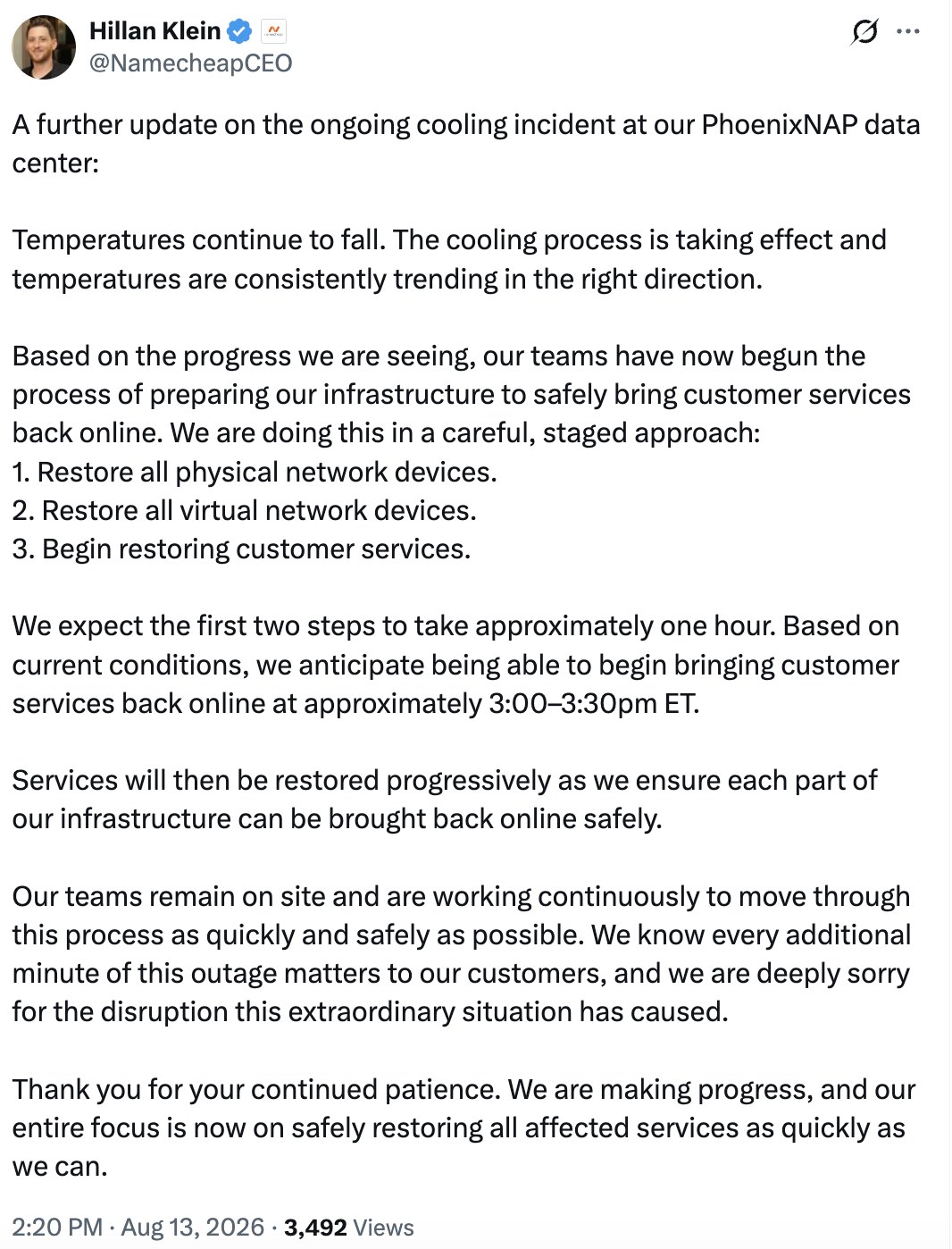
The company’s most recent update said temperatures in the data center are falling and that customer services would begin coming back online around 3:00 to 3:30 PM ET, restored in stages rather than all at once. Expect a slow, uneven recovery rather than a single moment where everything works again.
You can follow the official updates on the Namecheap status page.
What caused the Namecheap outage
This was not a hack, a bad deploy, or a billing dispute. It was air conditioning.
Namecheap’s servers live in a PhoenixNAP facility in Phoenix, Arizona. Overnight storms caused a series of utility power interruptions at the site, and those interruptions took out the building’s chillers, the industrial cooling units that keep a data center from cooking itself. PhoenixNAP’s own status page shows the facility detected rising ambient temperatures at 3:28 AM MST, hours before most customers noticed anything.
In Phoenix. In August.
Once temperatures climb past a safe threshold, an operator has two options: let hardware run hot and risk permanently destroying it, or power things down on purpose and stay dark until cooling is restored. Namecheap chose the second one. That is the right call, and it is also why the outage lasted so long.
To their credit, CEO Hillan Klein has been posting detailed updates publicly all day rather than hiding behind a status page. His 2:20 PM ET update laid out exactly how they planned to bring everything back:
Two of the facility’s four chillers were back online by noon ET. Temporary cooling units were trucked in. Everything after that was a waiting game.
Timeline of the August 13 outage
| Time (ET) | What happened |
|---|---|
| 6:28 AM | PhoenixNAP detects elevated temperatures in the Phoenix data center. Equipment begins rebooting. |
| 8:35 AM | Namecheap declares an emergency, citing a cooling system failure. Its own support helpdesk goes offline with everything else. |
| 12:00 PM | Two of four chillers are restored. Temperatures start dropping. |
| 2:20 PM | Namecheap outlines a three-stage recovery: physical network devices, then virtual network devices, then customer services. |
| 3:00 PM | Customer services expected to begin coming back online, restored progressively. |
What went down, and what stayed up
Nearly everything. The affected list covers:
- Namecheap.com and the account dashboard, so customers could not even log in to see what was happening
- Shared, VPS, and dedicated hosting, with sites returning 503 errors, loading slowly, or not loading at all
- EasyWP, Namecheap’s managed WordPress product
- DNS resolution and DNS management
- Email, including Private Email, shared hosting mailboxes, and email forwarding
- URL redirects
- Hosting operations such as activations, renewals, and plan changes
- The support helpdesk itself, which forced Namecheap to route customer support through backup Microsoft Teams accounts
Domain auctions kept running. That was about it.
The part most people missed: DNS
Here is what made today unusually painful.
If your website is hosted at Namecheap, an outage there takes your site offline. Bad, but expected. That is the deal you make with any host.
But DNS resolution also went down. DNS is the phone book of the internet: it translates your domain name into the numeric address of the server your site actually lives on. If your domain is registered at Namecheap and you left it on Namecheap’s default nameservers, then your domain stopped resolving today even if your website is hosted somewhere else entirely.
That means businesses running on a completely different host, with servers that were healthy and online the whole time, still went dark. Their email stopped delivering too. They did nothing wrong and had no way to fix it, because the control panel they would use to change nameservers was also down.
That is the difference between an outage that costs you a morning and an outage that costs you a day of leads.
What to do if your site is still down
Honestly? Mostly wait. But do these four things.
1. Confirm it is actually Namecheap. Check the status page before you start changing settings. Panic edits during an outage cause more damage than the outage does.
2. Do not move your nameservers mid-outage. It feels productive. It is not. DNS changes take time to propagate, and you can easily end up broken for longer than if you had left it alone.
3. Tell people. Post on your Google Business Profile and social channels that your site and email are temporarily down and give a phone number. Customers forgive an outage. They do not forgive silence.
4. Assume you missed messages. Email forwarding was down, which means contact form notifications and inbound email may simply be gone rather than delayed. Check your form plugin’s stored entries directly once you are back up, not just your inbox.
The real lesson: one company should not be able to take you offline
Namecheap is not a bad company. They communicated clearly, they made the right call protecting hardware, and a storm knocking out four chillers in a third-party facility is not something you can code your way around.
The lesson is not “leave Namecheap.” It is this: a lot of small businesses have quietly stacked their domain, their DNS, their hosting, and their email with one vendor, because it was simpler and slightly cheaper. That works fine right up until the day it does not, and then all four fail at once and there is no dashboard to log into.
Those are four separate jobs. They do not have to live in the same building.
How we set up client sites
We separate the layers on purpose, and today is exactly why.
Hosting is ours, not resold. Client sites run on servers we manage directly, primarily out of Raleigh, with global options through Vultr, AWS, and Google Cloud. When a registrar has a bad day, our clients’ servers are not in that building.
DNS runs through Cloudflare, not the registrar. Cloudflare’s DNS is free, fast, and spread across a global network. It also means the company you bought your domain from is not the same company that decides whether the world can find it.
Backups run daily, automatically. Plus a manual backup before any update. Restoring is a decision, not an archaeology project.
We watch it. Uptime monitoring means we usually know before the client does, which is the whole point of paying someone to handle this.
None of that is exotic. It is just what happens when someone sets your site up to survive a bad day instead of setting it up in the fewest possible clicks.
Frequently asked questions
How long was Namecheap down?
More than six hours. Elevated temperatures were detected at 6:28 AM ET, Namecheap declared an emergency at 8:35 AM ET, and services were expected to begin returning around 3:00 to 3:30 PM ET, restored in stages rather than all at once.
Was Namecheap hacked?
No. The cause was a cooling system failure at the PhoenixNAP data center in Phoenix, triggered by storm-related utility power interruptions. Namecheap powered systems down deliberately to protect hardware from heat damage.
Is my data safe?
Namecheap has not reported any data loss, and a controlled shutdown is specifically the move you make to avoid it. That said, if you do not have your own backups independent of your host, today is a good day to fix that.
My site is hosted elsewhere, so why did it go down?
Almost certainly DNS. If your domain is registered at Namecheap and still uses Namecheap’s nameservers, your domain stopped resolving during the outage regardless of where the site itself is hosted. Moving DNS to a separate provider such as Cloudflare prevents this.
Should I switch away from Namecheap?
Not reflexively. Every provider has an outage eventually, and the ones that publish honest updates during a bad day are usually the better ones. The change worth making is structural: stop keeping your domain, DNS, hosting, and email all in one place.
Need someone to look at your setup?
If today caught you off guard and you are not sure where your domain, DNS, hosting, and email actually live, we will map it out for you and tell you honestly whether it needs to change. No pressure, and no charge to look.
Call us at (919) 444-2005 or get in touch here. You can also read more about how our hosting works, or, if you are rethinking where your domains live, our breakdown of Cloudflare vs. GoDaddy domain pricing.