


Is Cloudflare safe? Yes. Cloudflare is a publicly traded security and network company, and roughly a quarter of all websites run through it. The checks it shows you and the 1.1.1.1 app are both legitimate. But the question usually comes up for one of three reasons: a “Verify you are human” page you didn’t expect, the 1.1.1.1 or WARP app on your phone, or a decision about putting your own website behind it. This guide covers all three, including Cloudflare’s real breach history and the fake Cloudflare pages that are spreading malware right now.
We put the websites we host behind Cloudflare and keep more than twenty client and company domains on its registrar, so this comes from people who use it every day and have had to work around its outages. Every claim below links to Cloudflare’s own documentation or a named security source, checked in October 2026.
Is Cloudflare safe?
Yes. Cloudflare is a real, publicly traded company that protects and speeds up millions of websites. Its checks, apps and DNS service are legitimate and widely trusted.
Cloudflare sits between a website and its visitors. When you load a site that uses it, your request goes to Cloudflare first, which filters out attacks and bots, serves cached copies of pages from a data center near you, and passes the rest along to the site’s real server. Cloudflare’s own docs describe this as acting as a reverse proxy.
The company was founded in 2009 in San Francisco and has traded on the New York Stock Exchange under the ticker NET since September 2019, per its public company record. Its reach is enormous. According to W3Techs’ October 2026 survey, Cloudflare is used by 27.0% of all websites and 85.6% of the sites whose reverse proxy is known.
That scale is part of why it is trustworthy, and part of why it is worth asking the question. When Cloudflare has a bad day, a big slice of the internet has one too.
Is Cloudflare legit, or is it a virus?
Cloudflare is legit and is not a virus. Its checking pages come from the website you visited, not from software on your computer, unless you installed Cloudflare’s app.
People ask “is Cloudflare a virus?” because the name pops up on screens they didn’t choose: a “Checking your browser” pause, a “Verify you are human” box, or an error page with a Cloudflare logo. All of those are served by the website, which has hired Cloudflare to screen its traffic. Nothing is installed on your device. Cloudflare says most visitors pass its challenges automatically, and the rest are asked for “minimal action such as checking a box or selecting a button.”
The only Cloudflare software that runs on your device is software you chose to install, such as the 1.1.1.1 app with WARP. If you see Cloudflare running on a work laptop you didn’t set up, your company’s IT team may use Cloudflare’s business tools, so ask them before removing anything.
Is that “Verify you are human” page real? How to spot a fake Cloudflare check
A real Cloudflare check only asks you to wait or click one box. If a page tells you to press Windows+R, paste something, or open Terminal, it is a scam.
This scam has a name: ClickFix. The page copies Cloudflare’s look down to the logo and the “Ray ID” footer. When you tick the box, it shows “verification steps” that tell you to press Win+R, then Ctrl+V, then Enter. SecurityWeek reported that the page has already loaded a PowerShell command into your clipboard, so those three keys open the Windows Run box, paste the command and run it. The payloads include password stealers like Lumma and Stealc and remote-access tools like NetSupport Manager.
Microsoft’s threat intelligence team says ClickFix campaigns target thousands of devices every day, and Mac users get their own version that pastes a command into the shell and asks for your system password.
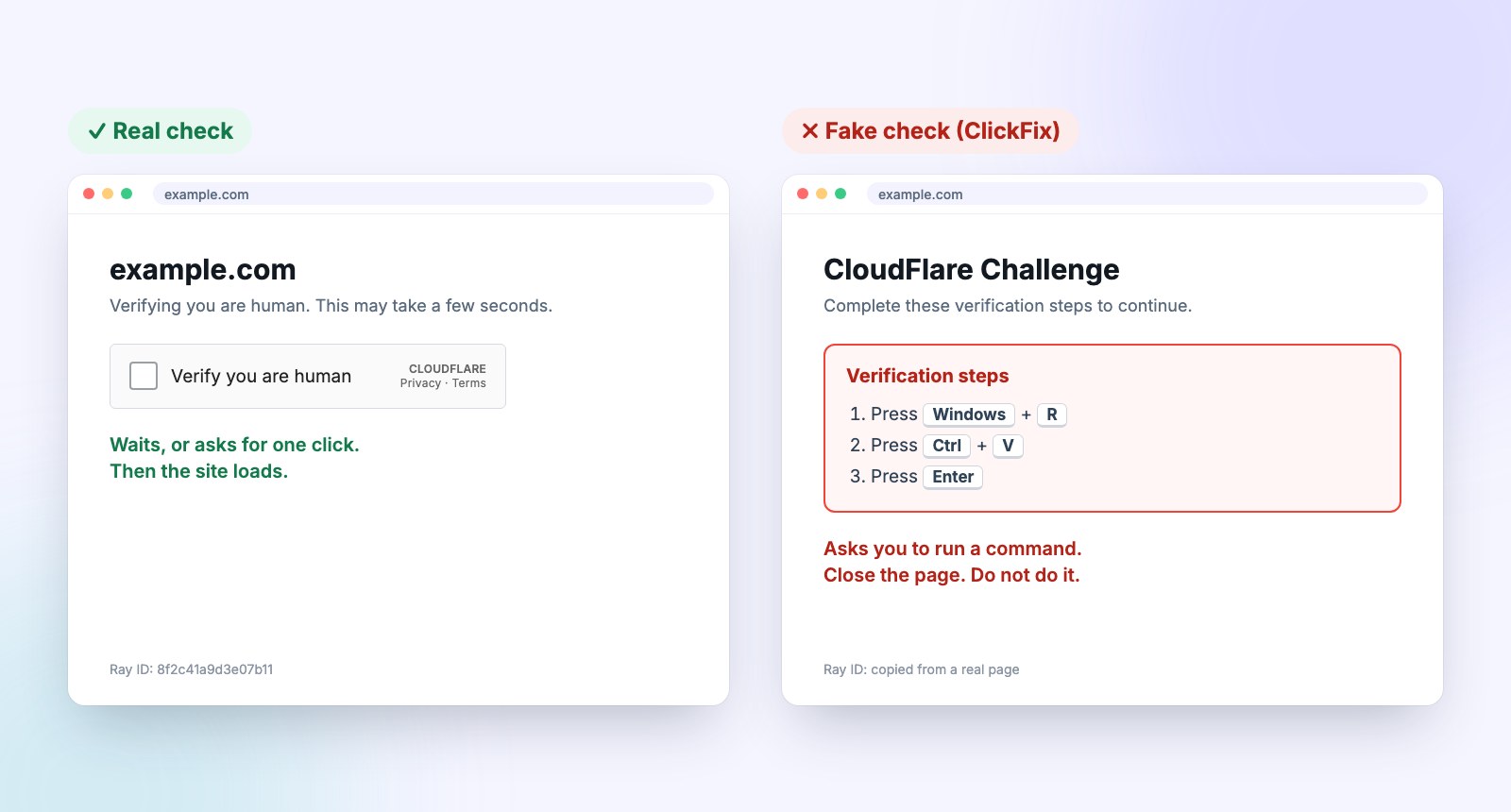
How to tell them apart:
- Real checks are passive or one click. Cloudflare says it does not use CAPTCHA puzzles or visual tests. No picture grids, no typing.
- Real checks never involve your keyboard shortcuts. Any instruction to press Win+R, Ctrl+V, open PowerShell, Command Prompt or Terminal is the giveaway.
- Watch the spelling. One fake popup was titled “CloudFlare Challenge.” Cloudflare doesn’t capitalize the F.
- Context matters. A check that appears on a site you know well, then demands extra steps, is a red flag that the site itself was hacked.
If you already ran the command, disconnect the computer from the internet, don’t log into anything on it, and get it checked or reset. Then change your important passwords (email first, then banking) from a different device, and turn on two-step login wherever you can. Info-stealers grab saved browser passwords, so assume those are exposed.
A note for website owners. These fake pages often live on real businesses’ websites. Microsoft documented one group that has been breaking into legitimate sites since March 2025, “possibly through WordPress vulnerabilities,” and swapping their pages for a fake Cloudflare check. If your own site ever shows a verification page you didn’t add, treat it as hacked. Our guide to what it costs to fix a hacked WordPress site walks through the cleanup, and the best defense is simply keeping WordPress and its plugins updated. Scams that impersonate trusted brands are a pattern, too; the PayPal invoice scam works the same way.
Has Cloudflare been hacked?
Yes, twice in notable ways. A 2017 bug leaked some website data, and a 2023 breach reached internal tools. Cloudflare says neither touched customer systems or SSL keys.
Cloudflare publishes a detailed post-mortem when something goes wrong, which most companies never do, so the record is easy to check.
| When | What happened | Customer impact (per Cloudflare) |
|---|---|---|
| Feb 2017 | “Cloudbleed”: a parser bug leaked bits of memory, including cookies and login tokens, into some web pages. Reported by Google Project Zero. | About 1 in 3.3 million requests affected. No customer SSL private keys leaked, no evidence of malicious use. |
| Nov 2023 | A suspected nation-state attacker used credentials stolen in Okta’s breach to get into Cloudflare’s internal wiki, bug tracker and source code system. | No customer data or systems impacted. Access was limited to the internal Atlassian tools. |
| Nov 18, 2025 | Not a hack: a database permissions change broke Cloudflare’s bot-detection file and took down much of its network for about six hours. | Sites behind Cloudflare showed error pages. Cloudflare called it its worst outage since 2019. |
The 2017 incident, nicknamed Cloudbleed, is documented in Cloudflare’s incident report. Some of the leaked data had been cached by search engines, and Cloudflare says it was purged with their help. The 2023 breach is covered in Cloudflare’s Thanksgiving 2023 write-up, which admits the root mistake plainly: the company had failed to rotate one service token and three service accounts that were exposed in Okta’s breach a month earlier. Cloudflare found “no evidence whatsoever” that the attacker reached its global network, data centers or SSL keys.
The November 2025 outage matters more to most business owners than either breach. Cloudflare’s post-mortem says it “was not caused, directly or indirectly, by a cyber attack,” but for a few hours, sites behind Cloudflare simply didn’t load. That’s the trade-off of putting a single company in front of a quarter of the web.
Can Cloudflare see your data?
Technically yes. To filter and cache traffic, Cloudflare decrypts it at its servers before passing it on. That’s why its privacy rules and audits matter.
This is the main privacy criticism of Cloudflare, and it’s a fair one. The padlock in your browser protects the connection between you and Cloudflare. Cloudflare then opens a separate encrypted connection to the website’s own server, if the site is set up correctly. In between, Cloudflare’s systems handle the traffic in readable form, which is how they can spot attacks.
You’re trusting Cloudflare the way you trust a hosting company or an email provider. Cloudflare backs that trust with third-party audits. Its published compliance summary lists SOC 2 Type II reports, ISO 27001 certification since 2019, and an annual PCI DSS assessment as a Level 1 service provider. For most businesses, that’s a higher bar than their own web host clears.
Is Cloudflare WARP safe? What about 1.1.1.1?
Yes. Cloudflare’s 1.1.1.1 DNS service doesn’t store your IP address, deletes its logs within 25 hours, and doesn’t sell your data. WARP is safe too.
1.1.1.1 is a DNS resolver, the service that turns a web address into the server it lives on. Your internet provider normally handles that, and can see every site you look up. Cloudflare’s privacy commitments for 1.1.1.1 say your IP address is never written to permanent storage, truncated IPs and resolver logs are deleted within 25 hours, Cloudflare “will not sell or share” users’ personal data, and a top-four accounting firm audits those practices.
WARP goes further and routes your device’s traffic through Cloudflare. According to Cloudflare’s WARP FAQ, it replaces your IP address with a Cloudflare IP that still reflects your approximate location, even on sites that don’t use Cloudflare. One exception: if you give a site access to your camera or microphone, that traffic skips WARP and your real IP is visible. Think of WARP as a privacy upgrade for everyday browsing. It isn’t built to hide where you are.
Why am I suddenly being blocked by Cloudflare?
Cloudflare blocks visitors based on rules the website owner sets. Send the site owner a screenshot showing the Ray ID so they can find and fix it.
A “Sorry, you have been blocked” or “Error 1020: Access denied” page means a security rule on that specific site matched your visit. Cloudflare’s error 1020 guide says the owner can look up the Ray ID and timestamp from your screenshot and then loosen the rule or allow your IP address. Before you write to them, try switching off any VPN or proxy and loading the page on a different network, like your phone’s data. Shared VPN addresses can trip these rules.
If you own the site and your customers are the ones getting blocked, the rule is in your Cloudflare dashboard under Security Events. A rule set too aggressively will turn away real buyers along with the bots.
Is Cloudflare safe to use for your business website?
Yes, and for most small businesses it makes the site safer. Set it up correctly: use Full (strict) SSL, lock down the account, and plan for rare outages.
Cloudflare’s Free plan includes “free SSL, CDN, DDoS protection and more,” which is why we put the sites we host behind it. Visitors get the padlock and faster load times, and the site’s real server address stays hidden from attackers. We use Cloudflare Registrar for domains as well, because it charges the wholesale price with no markup. Our Cloudflare vs GoDaddy domain pricing breakdown shows what that saves.
When business owners get burned, it’s usually in the setup:
- Flexible SSL mode. It puts a padlock in the browser while the connection from Cloudflare to your server stays plain HTTP. Cloudflare’s own SSL mode docs recommend Full or Full (strict) instead, especially for any site with logins. Full (strict) is the one to aim for, and it needs a valid certificate on your server.
- A weak Cloudflare login. Whoever controls the account controls your DNS, which means your website and your email. Turn on two-factor login and don’t share one password across your team.
- No plan for outages. When Cloudflare went down in November 2025, there was nothing site owners could do but wait. Outages like that are rare, but know who to call and how you’ll reach customers if your site is down for an afternoon. We saw the same thing with a domain registrar during the Namecheap outage in August 2026.
If you sell in a high-risk category, Cloudflare alone won’t keep you online; here’s how we keep stores running when they sell peptides online and hosts act on complaints.
If you’d rather not think about any of this, our hosting and maintenance plans include Cloudflare set up the right way, plus the WordPress updates that keep your site from becoming one of the hacked pages serving fake checks.
Frequently asked questions
Is it safe to click “Verify you are human” on a Cloudflare page?
Yes, if all it asks is a single click or a short wait. Stop if it then tells you to press Windows+R, paste anything, or open PowerShell or Terminal. That is a fake page trying to install malware.
Is Cloudflare trustworthy?
For most people and businesses, yes. It is a public company that publishes detailed reports when things go wrong, holds SOC 2 and ISO 27001 certifications, and has its DNS privacy promises audited by an outside accounting firm.
Is Cloudflare a proxy server?
Yes. For websites, Cloudflare works as a reverse proxy: visitors connect to Cloudflare, which filters and caches the traffic and then forwards requests to the site’s real server.
Can I avoid Cloudflare?
Not completely. About a quarter of all websites use it, and the site owner decides that, not the visitor. You can skip Cloudflare’s own apps and DNS service, but you will still pass through it on many sites.
Does Cloudflare sell your data?
Cloudflare says it will not sell or share the personal data of people using its 1.1.1.1 DNS service, and it deletes those logs within 25 hours. It makes its money selling security and network services to businesses.
Is Cloudflare free for websites?
Yes, there is a Free plan that includes SSL, a CDN and DDoS protection, which covers most small business sites. Paid plans add more advanced security and performance features.
The short version
Cloudflare is safe. It’s a public company in front of about 27% of all websites, its checks and apps are legitimate, and its two notable security incidents didn’t reach customer systems. The thing to watch for is fake Cloudflare pages: a real check asks for one click at most, and anything that tells you to press Win+R or paste a command is malware. If you run a website, Cloudflare is one of the cheapest security upgrades you can make, as long as it’s set up with Full (strict) SSL and a locked-down account.
Want your site behind Cloudflare without the guesswork, or worried your site is showing a check you didn’t add? Talk to us and we’ll take a look.